hsd_importdata
Note
Parameters set to None will use intelligent defaults from the pipeline context.
Pass explicit values to override context defaults.
- hsd_importdata(vis=None, session=None, hm_rasterscan=None, parallel=None, asis=None, process_caldevice=None, overwrite=None, nocopy=None, bdfflags=None, datacolumns=None, lazy=None, with_pointing_correction=None, createmms=None)[source]
Import ASDM/MS data into the single-dish pipeline context.
Loads the specified visibility data into the pipeline context, unpacking and/or converting it as necessary. The WebLog shows the summary of imported MSs, grouping of spws to be reduced together, and spw matching between Tsys and science spws.
Telescope pointing plots are generated and available from the MS Summary page (Home -- MS name --
Telescope Pointing). Two plot types are shown:On-source positions only.
All positions including OFF positions.
In these plots: the red circle indicates the beam size at the starting position of the raster scan; the red dot marks the last scan position; the green line represents antenna slewing motion; gray dots indicate flagged data. For moving objects (e.g. solar system bodies), an additional set of pointing plots with ephemeris correction is produced.
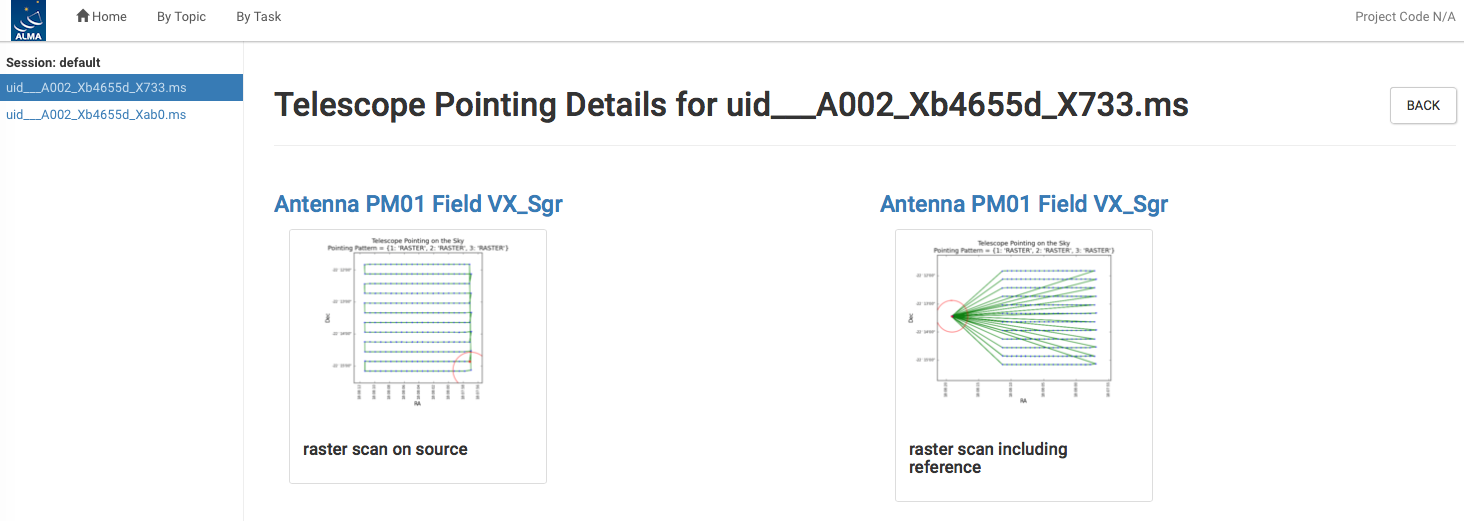
The detailed page of Telescope Pointing on the MS summary page.
If
overwrite=Falseand the task is asked to convert an input ASDM input to an MS, then when the output MS already exists in the output directory, theimportasdmconversion step is skipped, and the existing MS will be imported instead.- Parameters:
vis (list[str] | None) --
List of visibility data files. These may be ASDMs, tar files of ASDMs, MSes, or tar files of MSes, If ASDM files are specified, they will be converted to MS format.
Example:
vis=['X227.ms', 'asdms.tar.gz']session (list[str] | None) --
List of sessions to which the visibility files belong. Defaults to a single session containing all the visibility files, otherwise a session must be assigned to each vis file.
Example:
session=['Session_1', 'Sessions_2']hm_rasterscan (str | None) --
Heuristics method for raster scan analysis. Two analysis modes, time-domain analysis ('time') and direction analysis ('direction'), are available.
Default:
None(equivalent to'time')parallel (str | bool | None) --
Execute using CASA HPC functionality, if available.
Options:
'automatic','true','false',True,FalseDefault:
None(equivalent to'automatic')asis (str | None) --
Creates verbatim copies of the ASDM tables in the output MS. The value given to this option must be a list of table names separated by space characters. Default value, None, is equivalent to the following list.
'SBSummary ExecBlock Annotation Antenna Station Receiver Source CalAtmosphere CalWVR SpectralWindow'Example:
'Receiver',''process_caldevice (bool | None) --
Import the ASDM caldevice table.
Example:
TrueDefault:
None(equivalent toTrue)overwrite (bool | None) --
If
overwrite=Falseand the task is asked to convert an input ASDM to an MS, theimportasdmconversion step is skipped when the output MS already exists in the output directory, and the existing MS will be imported instead.Default:
None(equivalent toFalse)nocopy (bool | None) -- Disable copying of MS to working directory
bdfflags (bool | None) -- Apply BDF flags on import.
datacolumns (dict | None) --
Dictionary defining the data types of existing columns. The format is:
{'data': 'data type 1'}or
{'data': 'data type 1', 'corrected': 'data type 2'}For ASDMs the data type can only be RAW and one can only specify it for the data column. For MSes one can define two different data types for the DATA and CORRECTED_DATA columns and they can be any of the known data types (RAW, REGCAL_CONTLINE_ALL, REGCAL_CONTLINE_SCIENCE, SELFCAL_CONTLINE_SCIENCE, REGCAL_LINE_SCIENCE, SELFCAL_LINE_SCIENCE, BASELINED, ATMCORR). The intent selection strings _ALL or _SCIENCE can be skipped. In that case the task determines this automatically by inspecting the existing intents in the dataset. Usually, a single datacolumns dictionary is used for all datasets. If necessary, one can define a list of dictionaries, one for each EB, with different setups per EB. If no type is specified, {'data':'raw'} will be assumed.
lazy (bool | None) --
Use the lazy filter import.
Default:
None(equivalent toFalse)with_pointing_correction (bool | None) --
Apply pointing correction to DIRECTION. Add (ASDM::Pointing::encoder - ASDM::Pointing::pointingDirection) to the value to be written in MS::Pointing::direction.
Default:
None(equivalent toTrue)createmms (str | None) --
Create an MMS.
Default:
None(equivalent toFalse)
- Return type:
ResultsList[Results]
Notes
QA scoring:
1.0 if ATMOSPHERE intents are present.
1.0 if a single continuous observing session is present.
1.0 if all source coordinates are available.
-0.5 if existing processing history is detected.
-0.5 if existing model data is detected.
Examples
Load ASDMs from the
../rawdatadirectory into the context:
>>> hsd_importdata(vis=['../rawdata/uid___A002_X30a93d_X43e', '../rawdata/uid_A002_x30a93d_X44e'])
Load an MS in the current directory:
>>> hsd_importdata(vis=['uid___A002_X30a93d_X43e.ms'])
Load a tarred ASDM:
>>> hsd_importdata(vis=['../rawdata/uid___A002_X30a93d_X43e.tar.gz'])
Import a list of MeasurementSets:
>>> hsd_importdata(vis=['uid___A002_X30a93d_X43e.ms', 'uid_A002_x30a93d_X44e.ms'])