hsd_applycal
Note
Parameters set to None will use intelligent defaults from the pipeline context.
Pass explicit values to override context defaults.
- hsd_applycal(vis=None, field=None, intent=None, spw=None, antenna=None, applymode=None, flagbackup=None, parallel=None)[source]
Apply Tsys, sky, and Jy/K calibration tables to single-dish data.
Applies the Tsys (amplitude-scale), sky (OFF-source), and Kelvin-to-Jansky calibration tables stored in the pipeline context to the science target data. The WebLog lists the calibrated MSs with the names of the applied caltables and shows:
Frequency-averaged amplitude vs. time plots after calibration.
Time-averaged amplitude vs. frequency plots after calibration.
Heuristic plots of the XX-YY polarization amplitude difference (Figure showing a good case and a case requiring attention), useful for detecting receiver instabilities or polarization leakages.
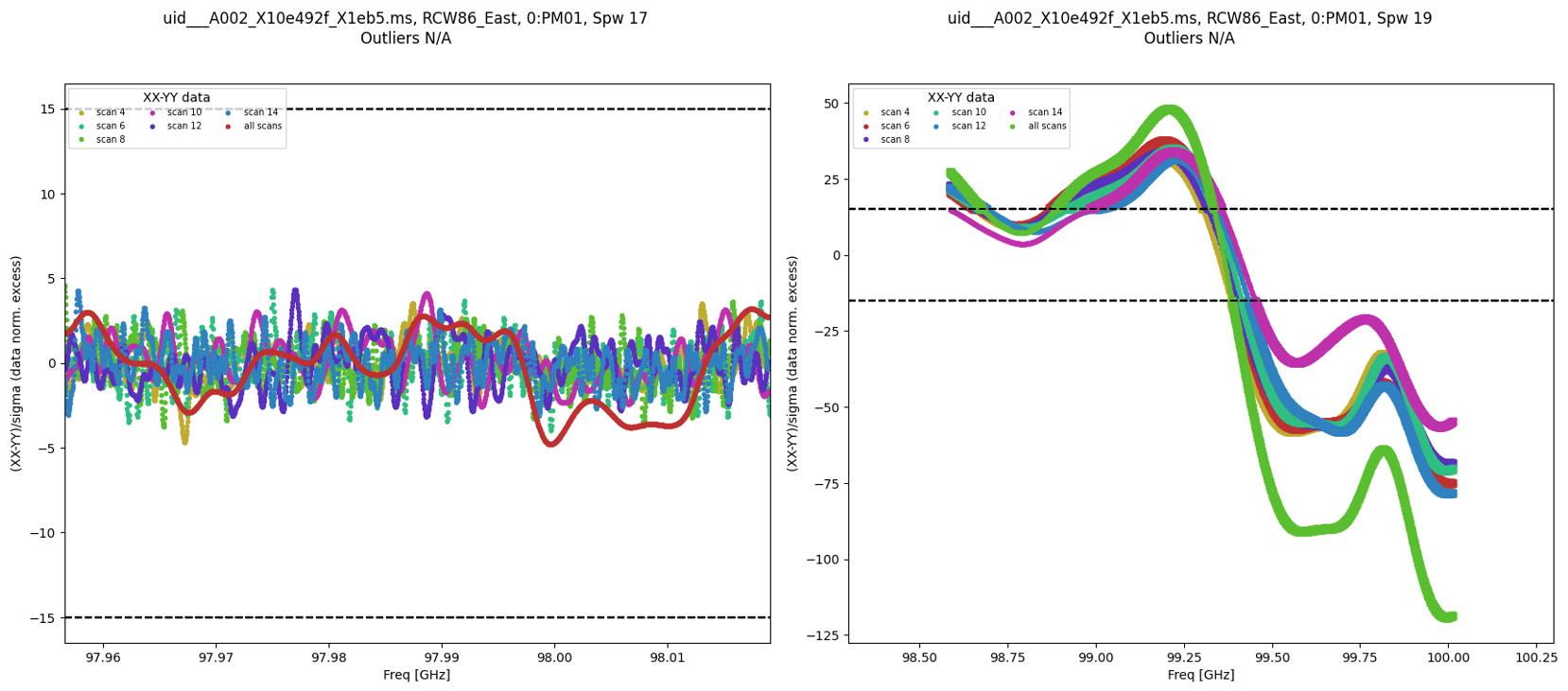
Heuristic plots for amplitude difference between two polarizations. Left: good case. Right: case requiring attention.
- Parameters:
vis (str | list[str] | None) --
The list of input MeasurementSets. Defaults to the list of MeasurementSets in the pipeline context.
Example: ['X227.ms']
field (str | list[str] | None) --
A string containing the list of field names or field ids to which the calibration will be applied. Defaults to all fields in the pipeline context.
Example: '3C279', '3C279, M82'
intent (str | list[str] | None) --
A string containing the list of intents against which the selected fields will be matched. Defaults to all supported intents in the pipeline context.
Example: '*TARGET*'
spw (str | list[str] | None) --
The list of spectral windows and channels to which the calibration will be applied. Defaults to all science windows in the pipeline context.
Example: '17', '11, 15'
antenna (str | list[str] | None) -- The selection of antennas to which the calibration will be applied. Defaults to all antennas. Not currently supported.
applymode (str | None) --
Calibration apply mode.
'calflag': calibrate data and apply flags from solutions.
'calflagstrict': same as above except flag spws for which calibration is unavailable in one or more tables (instead of allowing them to pass uncalibrated and unflagged). This is the default applymode.
'trial': report on flags from solutions, dataset entirely unchanged.
'flagonly': apply flags from solutions only, data not calibrated.
'flagonlystrict': same as above except flag spws for which calibration is unavailable in one or more tables.
'calonly': calibrate data only, flags from solutions NOT applied.
flagbackup (bool | None) --
Backup the flags before the apply.
Default: None (equivalent to True)
parallel (bool | str | None) --
Execute using CASA HPC functionality, if available. Default is None, which is equivalent to 'automatic' that intends to turn on parallel processing if possible.
Options: 'automatic', 'true', 'false', True, False
- Return type:
ResultsList[SDApplycalResults]
Notes
Two QA scores are computed:
Flagging QA (restricted to TARGET scans; falls back to all intents if no TARGET scans are present):
QA = 1.0 if additional flagging is 0%-5%.
QA = 1.0-0.5 if additional flagging is 5%-50%.
QA = 0.0 if additional flagging > 50%.
XX-YY polarization difference QA:
QA = 1.0 if no significant XX-YY polarization difference is detected.
QA = 0.95-0.65 if an XX-YY deviation is detected.
QA < 0.65 if a large XX-YY deviation outlier is detected.
Examples
Apply calibration to the science target data:
>>> hsd_applycal(intent='TARGET')
Apply calibration to specific fields and spectral windows:
>>> hsd_applycal(field='3C279, M82', spw='17', intent='TARGET')